
Beschreibung
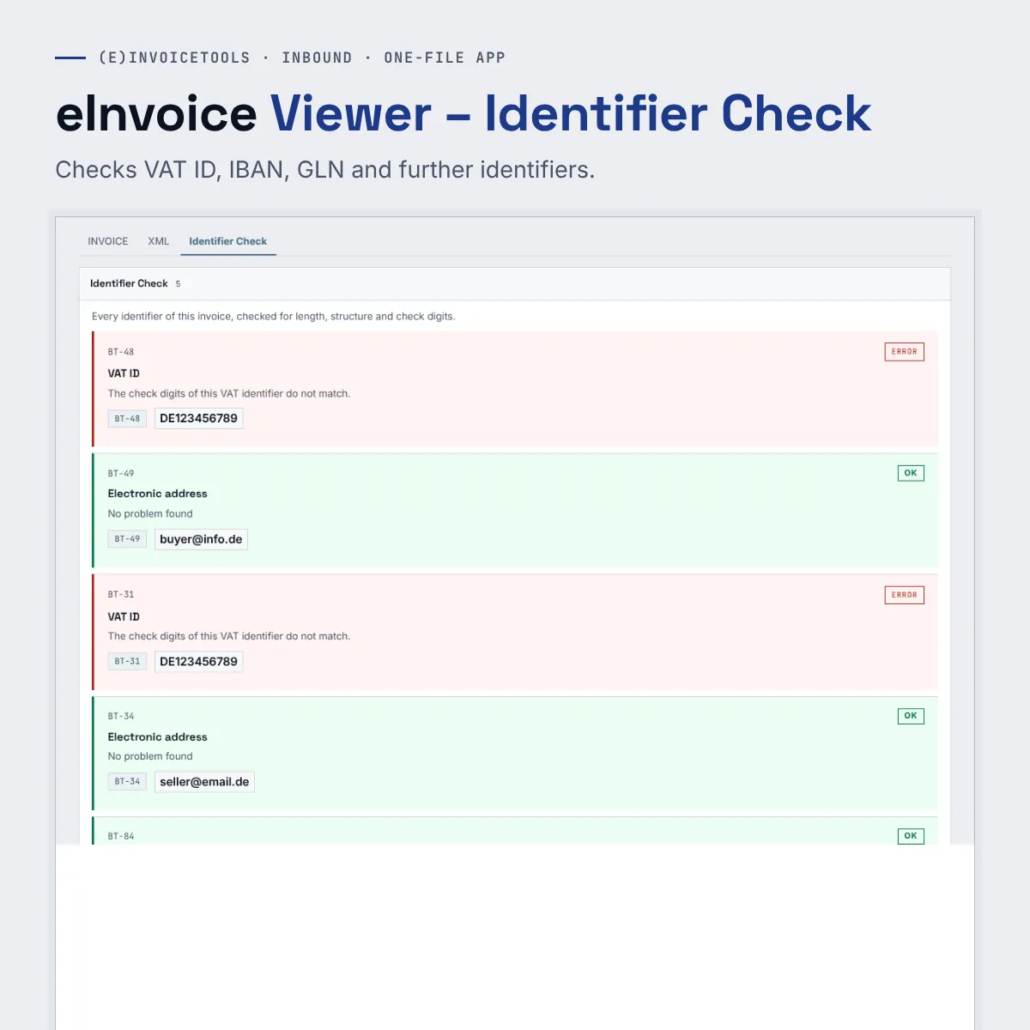
The Identifier Check checks every identifier in an e-invoice for length, structure and check digit. Identifiers are numbers such as the VAT ID, the GLN or the IBAN that clearly identify a company, a location, an account or an item.
It marks a wrong identifier in red, right at its field, and this check runs entirely in your browser. This lets accounts staff and invoice senders find transposed digits that a check against the official rule sets lets through.
What it does
- The accounts payable clerk before the payment run – She opens the incoming invoice in the viewer. If the IBAN field is marked in red, she asks the supplier before the payment goes out and comes back from the bank as a return.
- The invoice sender before sending – He drags his freshly created e-invoice into the viewer before he sends it. A transposed digit in his own VAT ID or in the customer’s GLN is noticed immediately.
- Red fields with an explanation – Below every wrong identifier, one sentence says what is wrong, so you know what needs correcting.
- The invoice stays in the browser – The viewer reads the invoice in your browser, and the identifier check runs there as well. Nothing is stored.
What you get
A ZIP file with the one-file app of the viewer and the add-on files of the extensions. You unpack it into a folder and open the HTML file with a double click. The paid edition has no daily limit, and you can pass it on by e-mail, put it on a USB stick or copy it to a network drive.
Try the demo first: eInvoice Viewer – Identifier Check – demo.
Manual: read the manual.


Rezensionen
Es gibt noch keine Rezensionen.