
Beschreibung
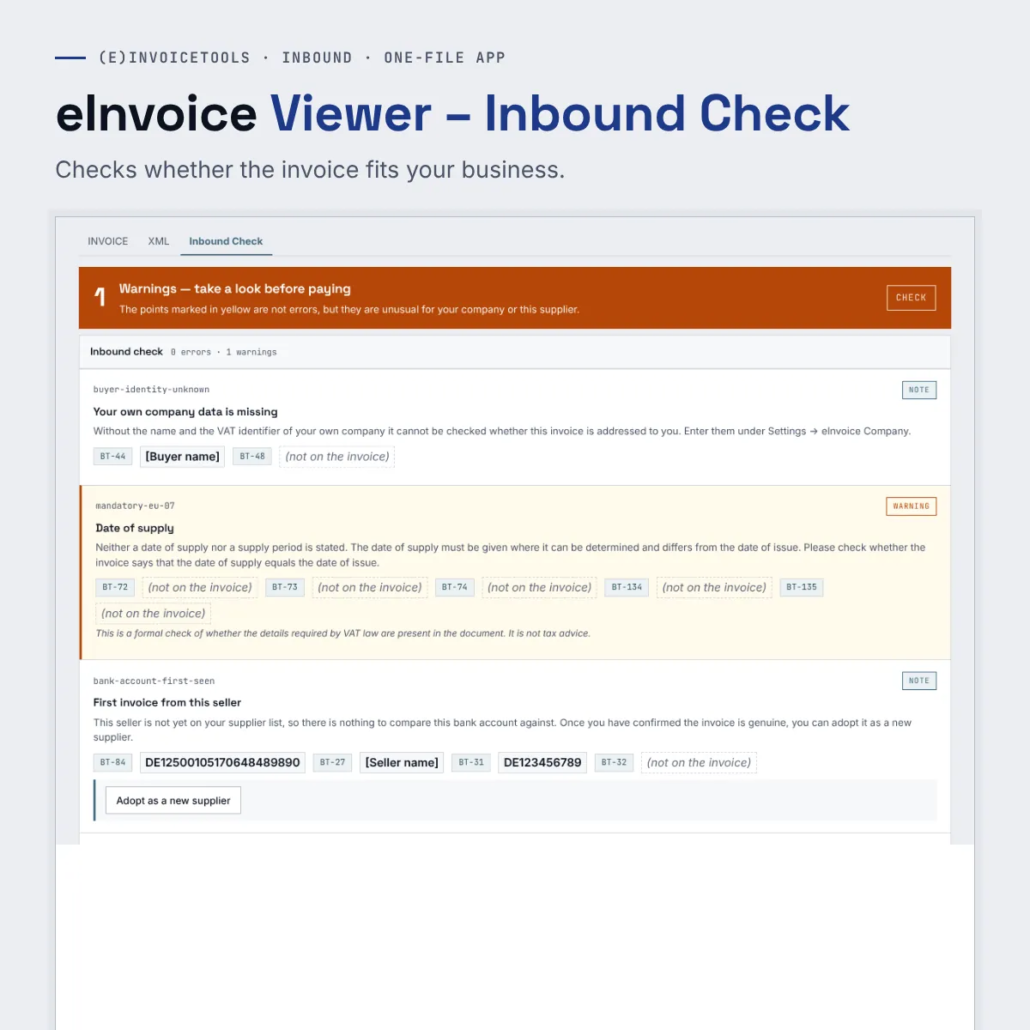
The Inbound Check compares an incoming e-invoice with your company data and your supplier list. It then tells you in full sentences what stands out, for example a wrong recipient company, an unknown account or a third-party payee.
For this it places the button “Inbound Check” in the view of the viewer, and one click is enough. It does not call any outside service.
What it does
- The accounts payable clerk – She opens every incoming invoice in the viewer and clicks “Inbound Check” before releasing it. If a red finding on the bank account shows up, she first calls the supplier and only pays afterwards.
- The managing director of a small company – He pays his invoices himself. He knows his suppliers well, but not their IBANs by heart. The supplier list remembers them for him.
- Findings in full sentences – Every finding says what does not fit and what you should do, instead of naming only a rule identifier.
- The invoice is not stored – The invoice data serve only the check and are discarded afterwards.
What you get
A ZIP file with the one-file app of the viewer and the add-on files of the extensions. You unpack it into a folder and open the HTML file with a double click. The paid edition has no daily limit, and you can pass it on by e-mail, put it on a USB stick or copy it to a network drive.
Try the demo first: eInvoice Viewer – Inbound Check – demo.
Manual: read the manual.


Rezensionen
Es gibt noch keine Rezensionen.